
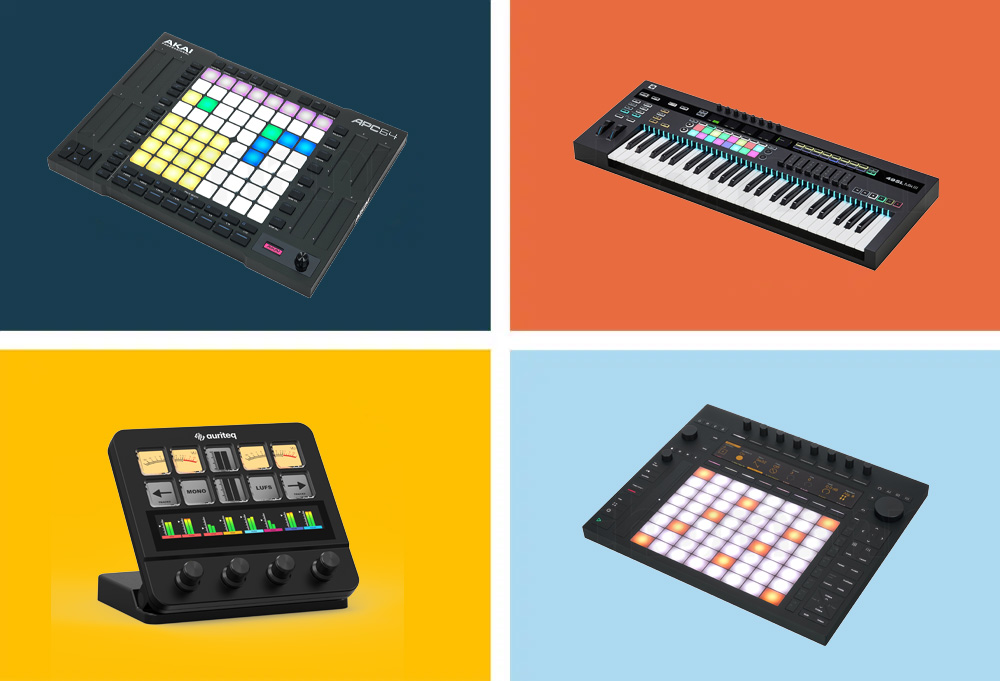
The good news: The ecosystem around Ableton is bigger than any other DAW. From affordable pad controllers for under 100€ to standalone instruments for nearly 2,000€, there's a solution for every workflow and budget. In this guide, we'll look at the 9 best controllers for Ableton Live 2026 — with honest assessments, technical data, and a clear recommendation on which controller suits which producer.
What to look for when buying an Ableton controller
Before we dive into the individual models, here are the most important criteria you should keep in mind:
- Ableton Integration: Not all controllers communicate equally deeply with Ableton. Some have their own scripts for direct Session View, Mixer, and Device control, while others are universal MIDI controllers that require manual mapping. The closer the integration, the less configuration effort.
- Pads or Keyboard? That's the fundamental question. Those who primarily work with clips, drums, and samples need pads. Those who want to play melodies and chords need a keyboard. Some controllers offer both.
- Pad Quality: For pad controllers, velocity sensitivity and polyphonic aftertouch are the decisive factors. Cheap pads without velocity detection severely limit you in expressive playing.
- Faders and Encoders: Indispensable for mixing control and plugin parameters. Faders provide direct tactile feedback, encoders are more flexible. Motorized faders move automatically with the project — that's a real upgrade for mixing.
- Display: A good display shows parameter names, metering, and clip information directly on the controller. This makes production significantly faster because you don't have to constantly look at the monitor.
- Portability: Those who produce on the go need something compact. Those with a fixed studio setup can also opt for larger controllers.
- Price: Everything from 89€ to nearly 2,000€ is available. More money generally means better pad quality, deeper integration, and more features — but even affordable controllers can be the better choice in the right context.
The 9 Best Controllers for Ableton Live 2026 at a Glance
1. Auriteq Flow — Best DAW Controller for Ableton
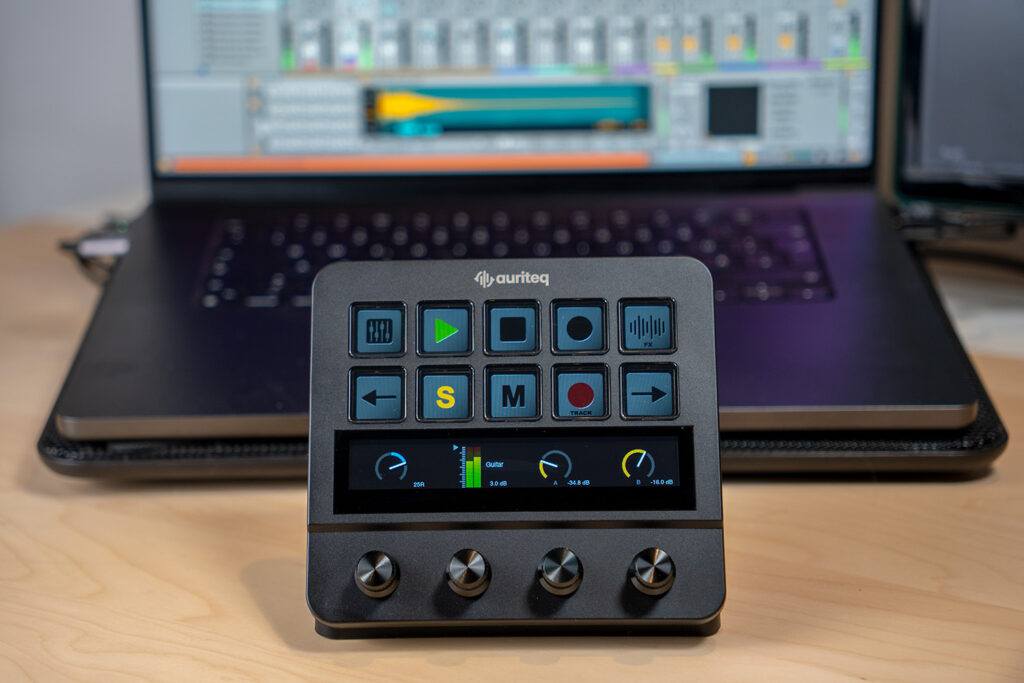
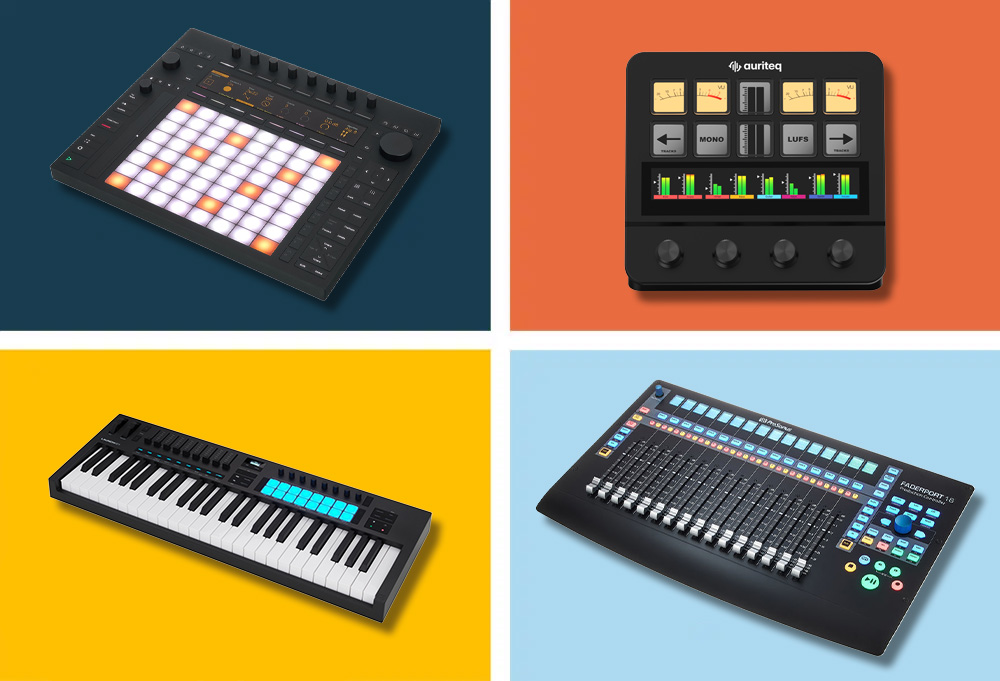
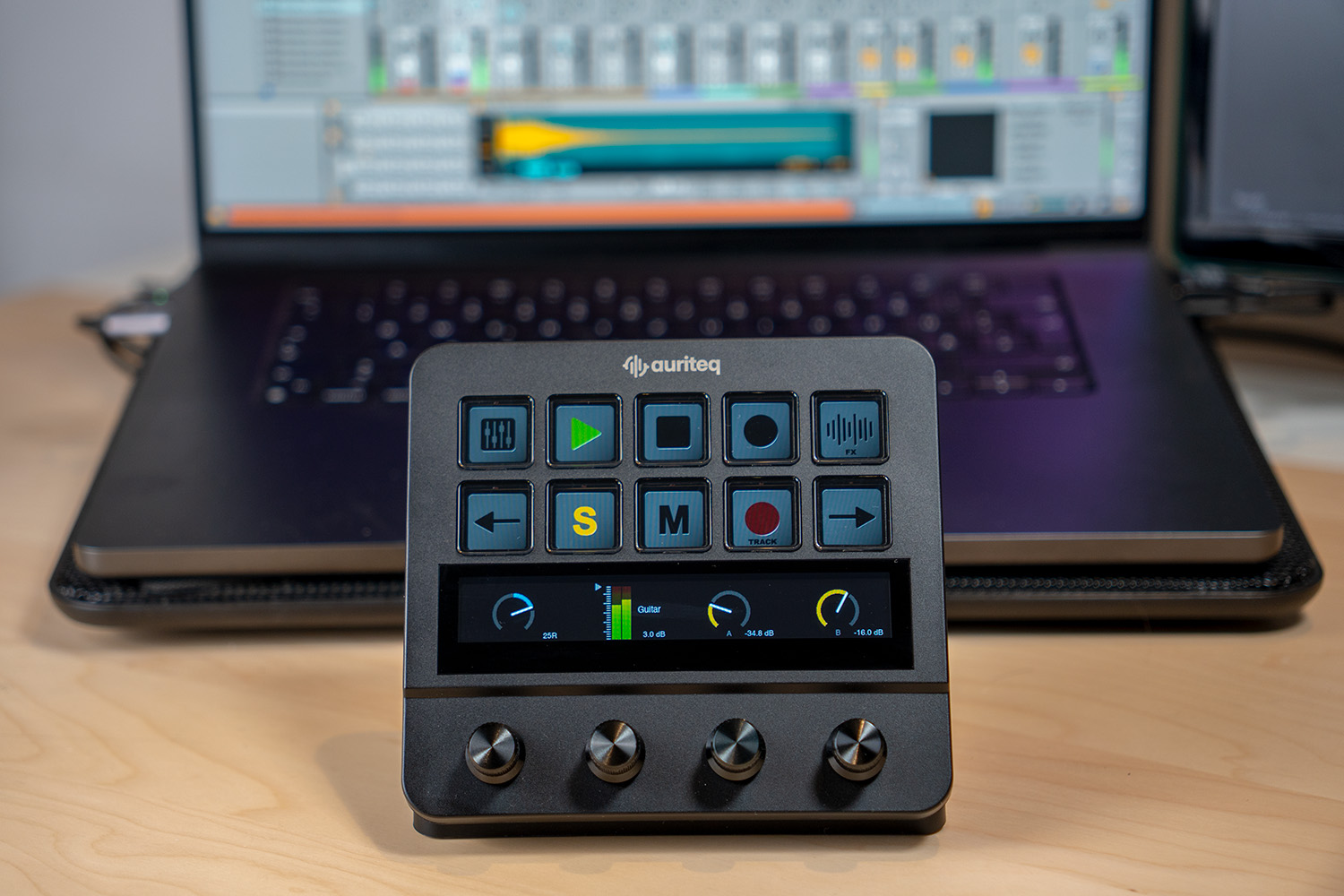
The Auriteq Flow is a relatively new player on the market that has quickly positioned itself as a serious addition to the Ableton setup. The concept: A compact desktop controller with a touchscreen, physical rotary knobs, and dynamic LCD buttons that seamlessly sits between you and your DAW — making the mouse completely unnecessary in many situations.
What sets the Flow apart from other controllers is the type of plugin integration. Where other controllers require tedious MIDI mapping or at best support the DAW's own instruments, the Flow automatically recognizes plugins — whether Serum, FabFilter, Valhalla, Soundtoys, or Kontakt. You open a plugin, the parameters appear on the touchscreen, and the physical knobs are immediately assigned. No setup, no MIDI learn, no configuration.
Additionally, there's a feature that surprisingly saves a lot of time in everyday use: Plugins, effects, and complete chains can be loaded and saved directly from the controller. Combined with the integrated LUFS metering (including VU meter, short-term loudness, dynamic range) and the 8-track mixer view with real-time level displays, you practically have a small mixing console on your desk. For Ableton producers who work a lot with third-party plugins and want to control their mix directly on the controller, there's currently nothing comparable in this price range.
TECHNICAL SPECS
Manufacturer: Auriteq
Controls: 10 dynamic LCD buttons, touch bar, 4 pressure-sensitive rotary knobs
Display: Touchscreen with real-time metering and plugin display
Metering: LUFS, VU, RMS, Dynamic Range (via included VST/AU plugin)
Mixer: 8-track mixer with level indicators directly on the display
USB Hub: 2x USB-3, 2x USB-C integrated
DAW Support: Ableton Live, Logic Pro, FL Studio (native integration)
Connection: USB-C
Colors: Black, White
Price: approx. 179€ (Launch offer, regular 199€)
ARGUMENTS IN FAVOR
- Automatic plugin mapping — works immediately with DAW-native and third-party plugins, no setup required
- Touchscreen shows plugin parameters, metering, and mixer view in real-time
- Integrated LUFS metering at a professional level — no separate plugin needed
- Load and save plugins, instruments, and complete chains at the touch of a button
- Create your own mappings in under 5 seconds
- Integrated USB hub tidies up the desk
- Solid build quality — feels like professional equipment
- Also usable as a macro controller outside the DAW (shortcuts for Premiere, Photoshop, etc.)
NEGATIVE POINTS
- Takes a bit of time to get used to all the scenes and functions — but after about 2 hours, you've got it
- No MIDI keyboard — you need a separate keyboard for melodies and chords
- No pads for clip launching or finger drumming
- Still a relatively new brand — the community and ecosystem are just growing
WHO IS IT SUITABLE FOR?
For producers and mix engineers who work a lot with plugins and want to noticeably speed up their workflow. Particularly interesting for anyone who knows the feeling that the DAW stands between them and the music. The Flow brings back tactile, direct working — without having to learn a completely new operating concept. For the price of under 200€, a pretty convincing overall package. (Our full review)
2. Ableton Push 3 — The deepest Ableton integration on the market
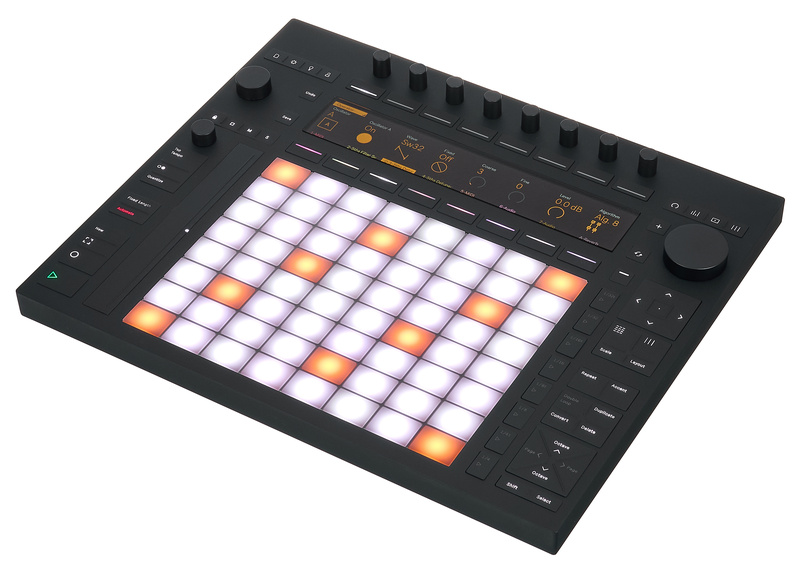
The Ableton Push 3 is less of a classic controller and more of a standalone instrument. In the standalone version, you can produce completely without a computer — with a built-in processor, audio interface, and battery. What Ableton has created here is impressive: The deepest integration with Ableton Live, paired with hardware that feels like a real instrument.
The 64 MPE-capable pads with polyphonic aftertouch allow for a playing style that's not possible with conventional pad controllers. Each pad responds individually to pressure and movement — making playing melodies, chords, and drums incredibly expressive. The high-resolution 9.07-inch display shows waveforms, clip contents, and plugin parameters in a level of detail you usually only get on a computer screen. Plus, there are 8 encoders, a jog wheel, a touch strip, and an integrated audio interface with ADAT connection.
The downside is obvious: The Push 3 works exclusively with Ableton Live. Anyone who occasionally works with another DAW risks having an expensive doorstop here. And the standalone version costs around €1,899, as much as a complete beginner studio. But for pure Ableton users who want to dive deep into the workflow — whether in the studio or on stage — there's simply nothing better.
TECHNICAL SPECS
Manufacturer: Ableton
Pads: 64 MPE-capable, velocity-sensitive pads with polyphonic aftertouch
Encoder: 8 rotary knobs
Additional inputs: Touch strip, jog wheel
Display: 9.07″ high-resolution display
Connections: USB, 2x MIDI I/O, Audio I/O (6.3mm), optical Toslink, ADAT
Standalone version: Intel Core i3, 8GB RAM, 256GB SSD, about 2.5 hours battery
Included Software: Ableton Live Intro (Controller Version) / Ableton Live Standard (Standalone)
Price: around €949 (Controller Version) / around €1,899 (Standalone)
ARGUMENTS IN FAVOR
- The deepest Ableton integration on the market — no other controller comes close
- MPE-capable pads allow incredibly expressive playing
- Standalone version: Produce without a computer, with battery
- High-resolution display shows waveforms, clips, and plugin parameters in detail
- Integrated audio interface with ADAT for expanded setups
- Perfect for live performance and stage production
- Premium build and feel
NEGATIVE POINTS
- Works exclusively with Ableton Live — no other DAW, no exceptions
- No traditional keyboard — you play melodies and chords on pads
- The standalone version is a real investment at around €1,899
- Even the pure controller version costs €949 — more than most alternatives
- Steep learning curve until you really master all the functions
WHO IS IT SUITABLE FOR?
If Ableton Live is your everything — in the studio and on stage — and you're ready to spend a good amount of money on it, there's nothing better. For those who occasionally work with another DAW or have a limited budget, the options further up and down this list are the smarter choice.
3. Novation Launchpad Pro MK3 — Best Pad Controller for Session View
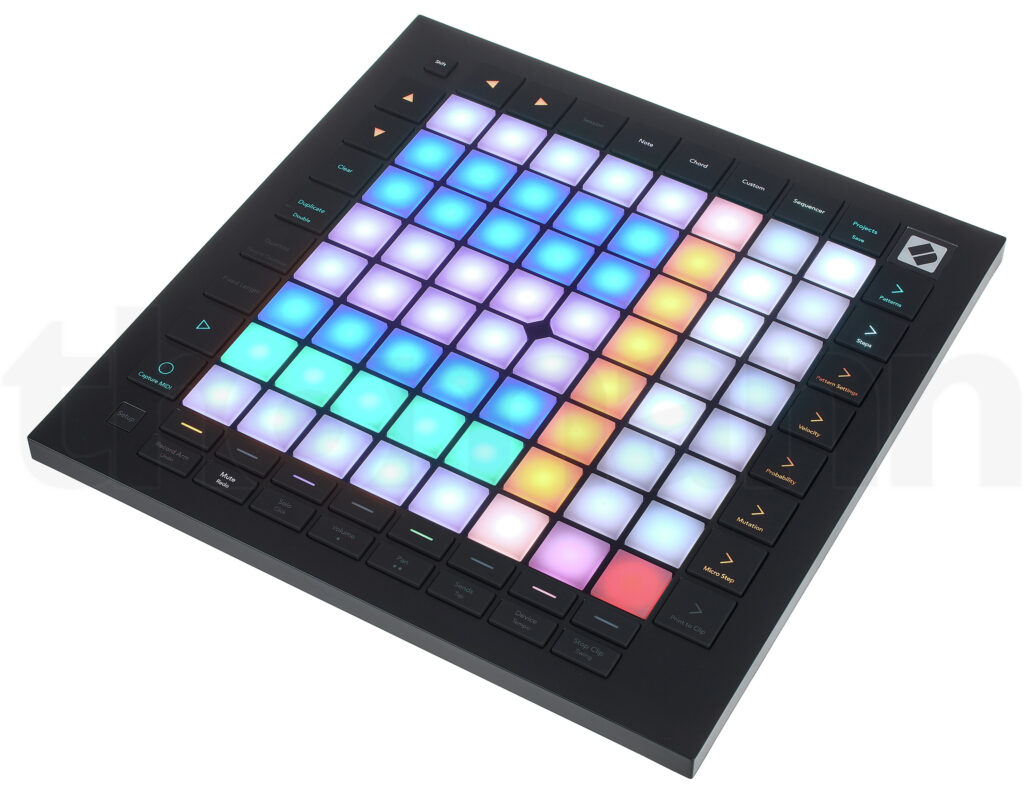
The Launchpad Pro MK3 has been the reference controller for clip-based production in Ableton for years. 64 velocity-sensitive RGB pads with polyphonic aftertouch, tight session view integration, and a build quality that more than justifies the price. If you primarily work with clips, scenes, and the typical Ableton grid workflow, this is exactly the tool designed for it.
What sets the Launchpad Pro apart from the cheaper X variant are mainly three things: the built-in 4-track sequencer with probability and mutation functions, the MIDI ports (2x MIDI Out + 1x MIDI In with TRS Type A) for connecting hardware synthesizers, and the overall deeper integration with Ableton, allowing mixer control and device management directly via the pads.
The device weighs only one kilogram and is compact enough to take to gigs. The built-in sequencer is handy for quick drum pattern ideas, even if you don't need a computer for it. The included software package (Ableton Live 12 Lite, Cubase LE, AAS Session Bundle, XLN Addictive Keys) is solid and sufficient for getting started.
TECHNICAL SPECS
Manufacturer: Novation
Pads: 64 velocity-sensitive RGB pads with polyphonic aftertouch
Sequencer: 4-Track 32-Step Sequencer with Probability and Mutation
Connections: USB-C (Bus-powered), MIDI In + 2x MIDI Out (TRS Type A)
Weight: 1 kg
Included Software: Ableton Live 12 Lite, Cubase LE, AAS Session Bundle, XLN Addictive Keys
Price: approx. 389€
ARGUMENTS IN FAVOR
- Deep session view integration — clip launching, mixer, and transport directly via the pads
- Polyphonic aftertouch on all 64 pads for expressive playing
- Built-in 4-track sequencer for quick drum ideas even without a computer
- MIDI ports for connecting external hardware synthesizers
- Compact and lightweight — great for stage use
- Solid software bundle included
- High-quality build and responsive pads
NEGATIVE POINTS
- Only pads — no keyboard keys for melodies and chords
- No encoders or faders for direct mixing control
- Compared to the cheaper Launchpad X, a significant price jump
WHO IS IT SUITABLE FOR?
The Launchpad Pro MK3 is the top choice for producers and DJs whose workflow is based on the session view. Those who launch clips, fire scenes, and perform live will find the most advanced pad controller in the Ableton ecosystem here. Also an excellent choice for electronic music and loop-based production.
4. Akai APC64 — Best for live performance and hardware integration
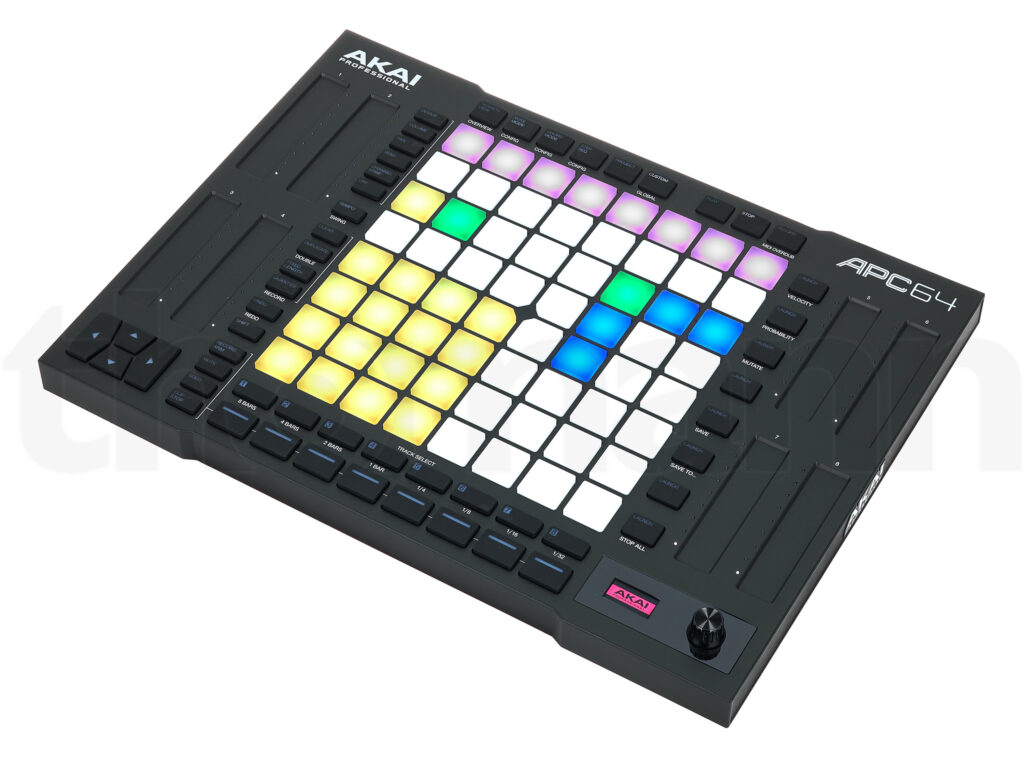
The Akai APC64 was developed in direct collaboration with Ableton, and you can tell right away: The clip colors automatically sync with the Ableton project, and the integration is spot on. 64 velocity-sensitive RGB pads with polyphonic aftertouch are expected at this price — what sets the APC64 apart are the 8 touch strips, which allow for more expressive parameter control than conventional faders.
In addition, there are features that set the APC64 apart from pure pad controllers: 8 CV/Gate outputs for controlling modular synthesizers, a built-in 32-step sequencer with 8 tracks, and MIDI In/Out for external hardware. This makes the APC64 the control center for setups that go beyond the computer — those who use Ableton as the heart of a larger hardware installation will find a well-thought-out tool here.
The touch strips take some getting used to — they respond differently than classic faders and require a certain level of dexterity. However, those who embrace them gain an expressive control option that can't be achieved with normal sliders. For live performance, the automatic clip color synchronization is a real highlight, as the setup visually reflects what's happening in Ableton right away.
TECHNICAL SPECS
Manufacturer: Akai Professional
Pads: 64 velocity-sensitive RGB pads with polyphonic aftertouch
Touch Strips: 8 assignable touch strips
Display: LED screen with push encoder
Sequencer: 32-step 8-track step sequencer
CV/Gate: 8x CV/Gate outputs
Connections: USB-C, 2x MIDI Out + 1x MIDI In (TRS)
Dimensions: 27.2 x 37.1 x 3.6 cm
Weight: 1,6 kg
Price: approx. 399€
ARGUMENTS IN FAVOR
- Developed in direct collaboration with Ableton — the integration is spot on
- Clip colors automatically sync with the Ableton project
- 8 touch strips for more expressive control than classic faders
- 8 CV/Gate outputs for connecting modular synthesizers
- Built-in 32-step sequencer with 8 tracks
- MIDI ports for external hardware synthesizers
- Compact design despite a wide range of functions
NEGATIVE POINTS
- No keyboard keys — purely pad-based
- No traditional faders — the touch strips require some getting used to
- A bit more expensive than the Launchpad Pro MK3 with a similar number of pads
- No display with parameter names — less visual feedback than with Push 3
WHO IS IT SUITABLE FOR?
The APC64 is the right choice for live performers and producers with an extended hardware setup. If you want to integrate modular synthesizers into your Ableton setup or are looking for a more expressive alternative to conventional faders, this is a well-thought-out package. Particularly interesting for users who want to control both software and hardware instruments.
5. Novation Launchkey MK4 (49 keys) — Best Allrounder
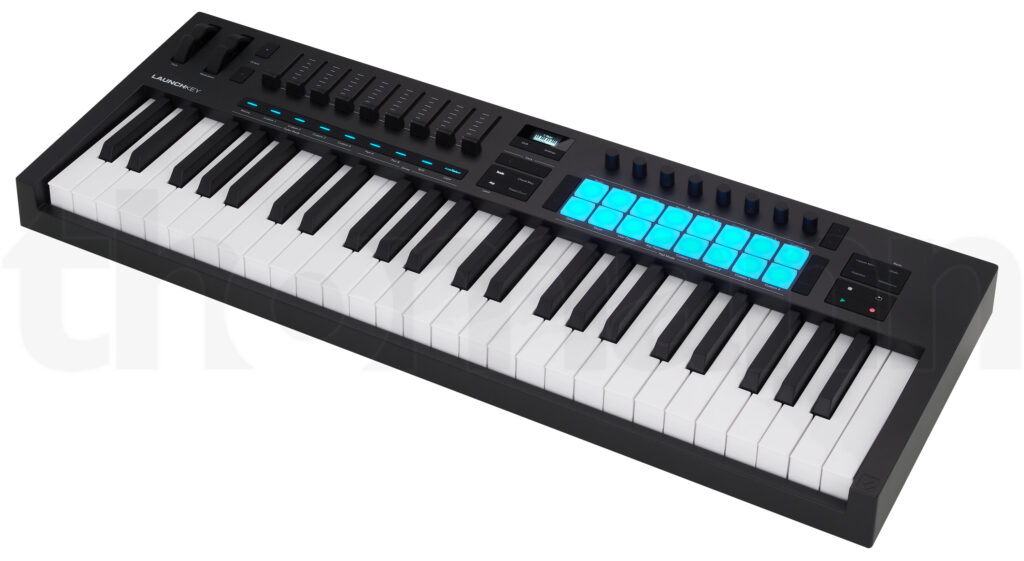
The Novation Launchkey MK4 is currently one of the most popular MIDI controllers on the market — and rightly so. In its fourth generation, Novation has completely revamped the design and created a device that offers an incredible amount for both beginners and experienced producers. 49 semi-weighted keys, 16 velocity-sensitive RGB pads, 9 faders, 8 rotary knobs, and an OLED display — all in one device.
What makes the Launchkey MK4 so special is the deep DAW integration. Ableton users benefit the most: Session View, Mixer, Device control — everything is immediately accessible without having to configure anything. The 9 faders are large enough for comfortable mixing, and the OLED display shows parameter names, making working with plugins and mixers much clearer.
In addition, there are creative features like 30 scale modes, chord modes, and a generative arpeggiator that provides quick inspiration. The included software bundle is generous: Ableton Live Lite, Cubase LE, and plugins from Klevgrand, GForce, Native Instruments, and Orchestral Tools. For around 219€, you get a true all-rounder that combines keys, pads, faders, and encoders in one device.
TECHNICAL SPECS
Manufacturer: Novation
Keys: 49 semi-weighted waterfall keys
Pads: 16 velocity-sensitive RGB pads
Fader: 9 faders
Encoder: 8 rotary knobs
Display: OLED display for real-time feedback
Connection: USB-C (bus-powered)
Included Software: Ableton Live Lite, Cubase LE, Novation Play, plugins from Klevgrand, GForce, Native Instruments, and Orchestral Tools
Price: approx. 219€
ARGUMENTS IN FAVOR
- Excellent DAW integration, especially with Ableton Live — Session View, Mixer, and Devices immediately controllable
- Built-in creative chord and scale modes — perfect for songwriters and melody work
- Generative arpeggiator for quick inspiration
- 9 faders + 8 encoders = maximum control over the mix
- OLED display shows parameter names and current values
- Large software bundle included
- Excellent price-performance ratio
NEGATIVE POINTS
- Not the best choice if you need weighted keys for piano playing
- Takes up relatively much space on the desk
- No standalone operation possible
WHO IS IT SUITABLE FOR?
The Launchkey MK4 is perfect for producers looking for an all-in-one controller — MIDI keyboard, pad controller, and mix control in one device. Highly recommended for Ableton users who need keys, pads, and faders and don't want to set up multiple separate devices. Also a solid choice with other DAWs like Logic, Cubase, and FL Studio.
6. Ableton Move — Best for on the go
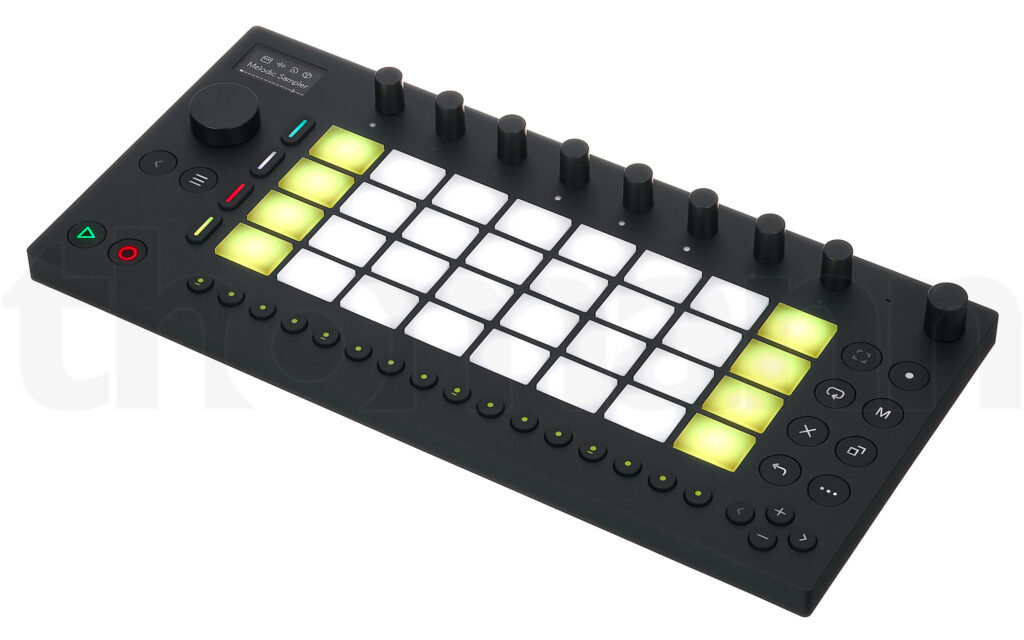
The Ableton Move is not a classic controller — it's a standalone instrument that works completely without a computer. 32 velocity-sensitive pads, 9 high-resolution encoders, an OLED display, and a touch-sensitive clickwheel are packed into a device that fits in a backpack and lasts about 4 hours thanks to the battery.
With over 1,500 built-in Ableton sounds — including Drift, Wavetable, Drum Sampler, and Melodic Sampler — you have enough material to work out complete ideas on the go. There's a built-in microphone and speaker, which don't deliver studio quality but are sufficient for quickly listening to and recording ideas. The real kicker: Once you're back at the computer, the projects sync seamlessly with Ableton Live. The Move is essentially a sketchpad — a place where ideas are born and then refined in the studio.
The limitations are clear: 32 pads instead of the usual 64, a small display, and at around €449, the Move isn't exactly cheap for a device that primarily serves as an idea tool. However, if you produce a lot on the go or want to break free from computer distractions, you'll get a well-thought-out instrument here that no other manufacturer offers in this form.
TECHNICAL SPECS
Manufacturer: Ableton
Pads: 32 velocity-sensitive, backlit pads
Encoder: 9 high-resolution encoders
Display: OLED display (128×64)
Navigation: Touch-sensitive clickwheel
Processor: Quad-Core ARM Cortex-A72, 1.5 GHz
RAM: 2 GB
Battery: Approx. 4 hours runtime
Audio: 3.5mm stereo outputs, built-in microphone and speaker
Sounds: 1,500+ built-in Ableton instruments and samples
Price: Approx. €449
ARGUMENTS IN FAVOR
- True standalone operation — produce without a computer, anywhere
- Over 1,500 built-in Ableton sounds for complete music production
- Seamless synchronization with Ableton Live on the computer
- Built-in microphone and speaker for quick ideas
- Good battery life of about 4 hours
- Compact and lightweight — take it anywhere
- Touch-sensitive clickwheel for intuitive navigation
NEGATIVE POINTS
- Only 32 pads — half of the usual 64-grid controllers
- Small display offers little overview for more complex projects
- Not a full production computer — more of a sketchpad than a studio replacement
- No keyboard integrated
- Not exactly cheap for an idea tool at €449
WHO IS IT SUITABLE FOR?
The Ableton Move is the right device for producers who are on the go a lot and want to capture their musical ideas everywhere. Also interesting for those who consciously want to detach from the computer and work purely with their hands. As a sketchpad with seamless Ableton integration, there's currently nothing comparable.
7. Novation Launchpad X — Best entry into the pad world
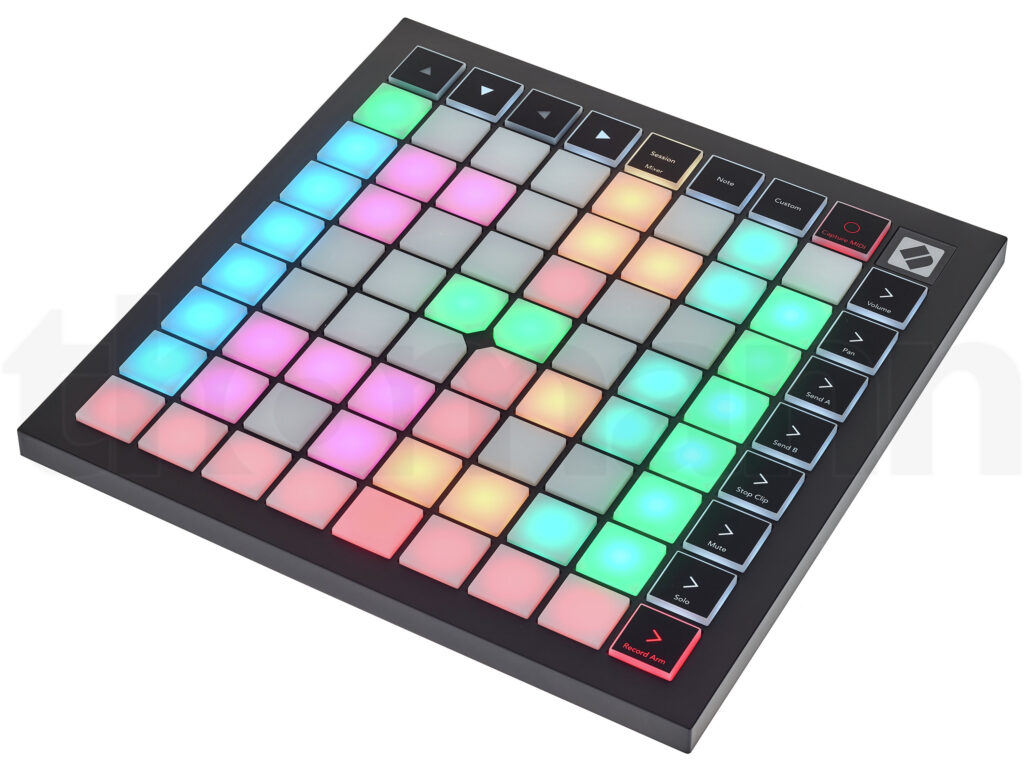
The Novation Launchpad X offers the full 64-pad grid with velocity-sensitive RGB pads and polyphonic aftertouch — and that for about €199. If you're buying a pad controller for Ableton for the first time and aren't sure if the investment is worth it, this is a solid and affordable entry option.
The Ableton integration works smoothly: Session View, clip launching, and basic mixer control are immediately available. Additionally, there are note and scale modes that allow you to play melodies without a keyboard — handy for quick ideas. The Launchpad X is compact, bus-powered, and requires no complex setup.
What's missing compared to the more expensive Pro model: no built-in sequencer, no MIDI ports, and no faders or encoders. At its core, it's a pure pad controller — nothing more, nothing less. But for clip launching, finger drumming, and session view work, that's more than enough. The software bundle (Ableton Live 12 Lite, Cubase LE, 40 Melodics lessons) rounds off the package.
TECHNICAL SPECS
Manufacturer: Novation
Pads: 64 velocity-sensitive RGB pads with polyphonic aftertouch
Buttons: 16 function buttons
LEDs: 81 RGB LEDs
Connection: USB-C (bus-powered)
Modes: Note and scale modes for melody playing
Included Software: Ableton Live 12 Lite, Cubase LE, AAS Session Bundle, XLN Addictive Keys, 40 Melodics lessons
Price: about €199
ARGUMENTS IN FAVOR
- Complete 64-pad grid at a fair price
- Polyphonic aftertouch on all pads for expressive playing
- Solid Ableton session view integration
- Note and scale modes for quick melody ideas without a keyboard
- Compact and bus-powered — no complex setup needed
- Solid software bundle included
- Responsive pads with good feedback
NEGATIVE POINTS
- Only pads — no keys, faders, or encoders
- No built-in sequencer (only available in the more expensive Pro model)
- No MIDI ports for external hardware
- No mixer control via physical knobs
WHO IS IT SUITABLE FOR?
The Launchpad X is the ideal entry-level option for Ableton producers who want to dip their toes into the world of pad controllers without spending 400€. It's also a solid choice for DJs and electronic musicians who work session-view-based.
8. Akai APC Mini MK2 — Best Budget Controller
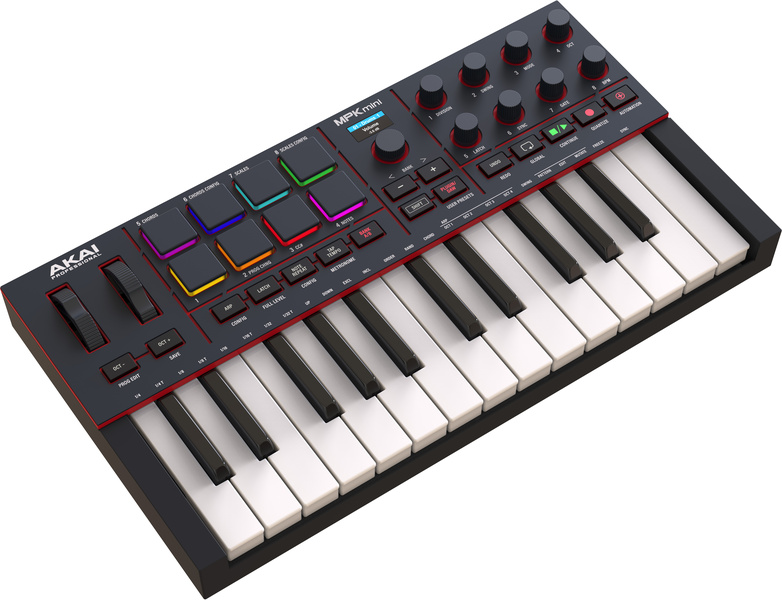
64 RGB pads and 9 faders for about 89€ — that's hard to beat. The Akai APC Mini MK2 is the cheapest way to get into controller-based Ableton production. No frills, no unnecessary features — just a functional controller that does what it's supposed to do.
The compromise for the price is clear: The pads have no velocity sensitivity and no aftertouch. So you can't press with varying strength, which limits expressive playing. But for pure clip launching, scene triggering, and basic mixer control, that's no problem. The device mode is handy, where the 9 faders are automatically mapped to plugin macros — giving the budget controller unexpectedly much functionality.
The build quality is functional but okay. The APC Mini MK2 is extremely compact, bus-powered, and easy to set up. For beginners who want to test whether controller-based work suits their workflow, it's a low-risk investment. And if you upgrade later, you've had an affordable learning platform.
TECHNICAL SPECS
Manufacturer: Akai Professional
Pads: 64 RGB-lit pads (without velocity sensitivity)
Fader: 9 faders
Modes: Drum Mode, Device Mode
Soft Keys: Solo/Mute/Stop/Record-Arm buttons
Connection: USB (bus-powered)
Included Software: Ableton Live Lite, AIR Music Technology Virtual Instruments
Price: about 89€
ARGUMENTS IN FAVOR
- Unbeatable price for 64 pads and 9 faders
- Direct session-view integration with Ableton
- Device mode automatically maps faders to plugin macros
- Extremely compact — fits next to any setup or in a bag
- Bus-powered, no additional power supply needed
- Easy setup and operation
NEGATIVE POINTS
- No velocity sensitivity on the pads — no expressive playing possible
- No aftertouch
- No MIDI ports for external hardware
- Build quality is functional, not premium
WHO IS IT SUITABLE FOR?
The APC Mini MK2 is the logical choice for beginners and budget-conscious producers who want to dip their toes into the controller world. It's also more than sufficient for DJs who just want to launch clips and do basic mixing. However, those who need more expressive playing should go for the Launchpad X or Pro MK3.
9. Novation SL MK3 (49/61 keys) — Best premium keyboard with Ableton integration
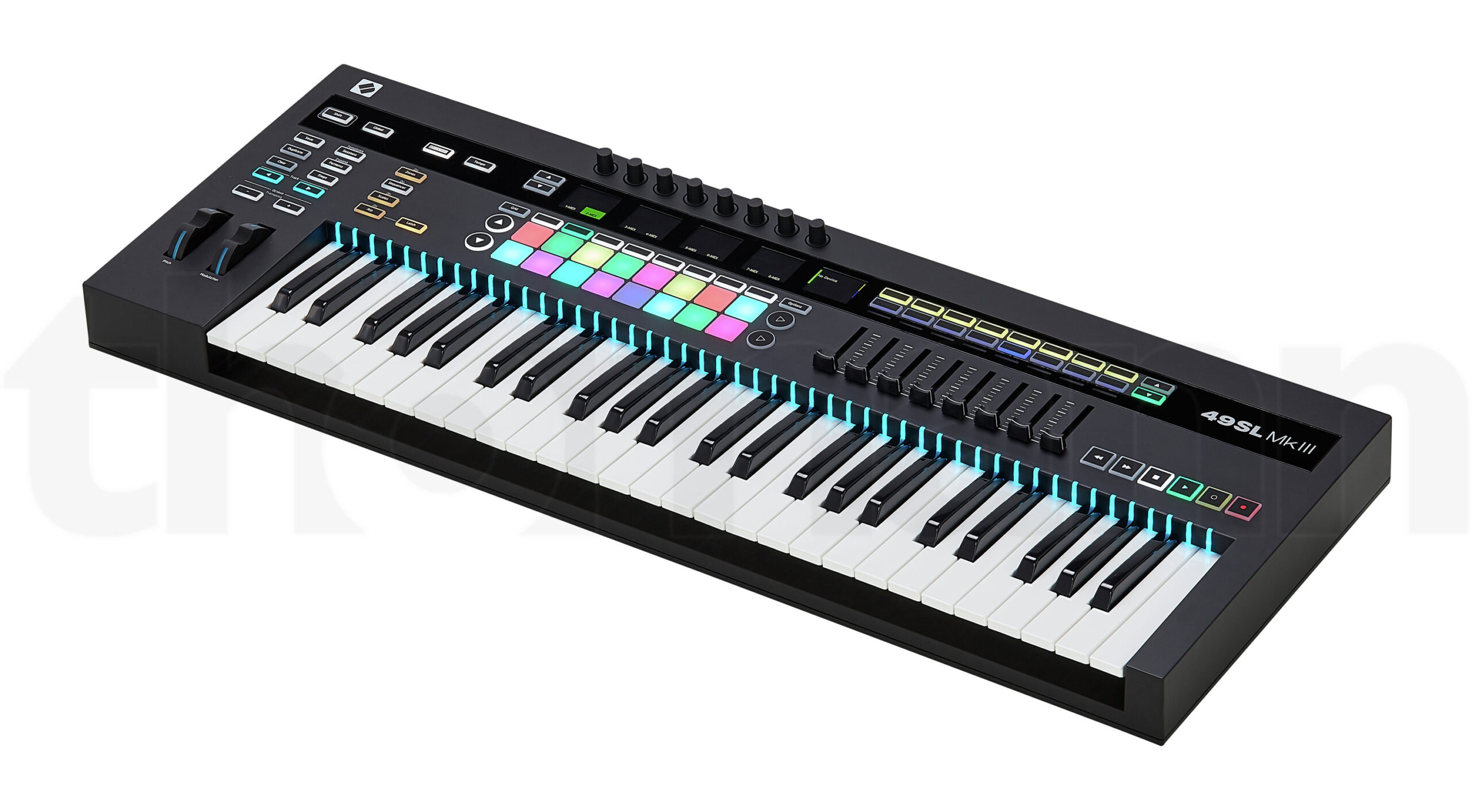
The Novation SL MK3 is aimed at keyboardists who are looking for a real instrument and want to deeply control Ableton at the same time. The semi-weighted synth keys work with a scan rate of 10 kHz — this means that every keystroke is captured extremely precisely, which is especially noticeable when playing fast passages and dynamic synth parts. Each key has its own RGB LED that shows in real-time which notes are active.
The real highlight: Each of the 8 faders and each of the 8 encoders has its own full LCD display. So you can always see exactly which parameter is assigned to which control. This might sound like a small detail, but it's a huge advantage in everyday use because you no longer have to guess. There's also an 8-track sequencer with probability and mutation functions, and — particularly interesting for hardware enthusiasts — CV/Gate and modulation outputs for controlling analog synthesizers.
The SL MK3 is available with 49 or 61 keys and comes with corresponding weight (about 6–7 kg). It's not portable — but for a fixed studio setup, that's irrelevant. The price of about €599 (49 keys) or €699 (61 keys) is not a bargain, but for a professional keyboard with this level of DAW integration and hardware connectivity, it's quite reasonable.
TECHNICAL SPECS
Manufacturer: Novation
Keys: 49 or 61 semi-weighted synth keys with aftertouch (10 kHz scan rate)
LED feedback: RGB LEDs on each individual key
Fader: 8 faders with their own LCD displays
Encoder: 8 rotary encoders with their own LCD displays
Sequencer: 8-track sequencer with probability and mutation
Connections: USB, MIDI In/Out/Out2-Thru, 6.35mm footswitch/expression/sustain inputs
CV/Gate: 2x CV/Gate/Mod outputs, clock output
Included Software: Ableton Live Lite, Novation plugins
Price: about €599 (49 keys) / €699 (61 keys)
ARGUMENTS IN FAVOR
- Premium keyboard with 10 kHz scan rate — extremely precise playing feel
- RGB LEDs on each key show active notes in real-time
- Each fader and encoder with its own LCD display — always full overview
- Deep Ableton integration (developed in collaboration with Ableton)
- Built-in 8-track sequencer with probability functions
- CV/Gate outputs for modular and analog synthesizers
- MIDI In/Out for external hardware
- High-quality construction with real instrument character
NEGATIVE POINTS
- A significant investment at €599–699
- No pads — for finger drumming and clip launching, you need a separate device
- Large and heavy (about 6–7 kg) — not for on the go
- Takes up a lot of space on the desk or in the rack
WHO IS IT SUITABLE FOR?
The SL MK3 is the right choice for keyboardists who take Ableton seriously and expect a professional playing feel. Particularly interesting for producers with an extended hardware setup who want to integrate analog synthesizers into the Ableton workflow via CV/Gate. If you primarily need pads, you're better off with a Launchpad or APC.
Comparison table: All 9 controllers at a glance
| Controller | Type | Pads/Keys | Fader/Encoder | Display | Price | Best for |
|---|---|---|---|---|---|---|
| Auriteq Flow | Mixing controller | 10 LCD buttons | 4 encoders | Touchscreen | ~179€ | Plugin control & mixing, save your own shortcuts, plugins & chains and insert with one button |
| Ableton Push 3 | Pad controller / Standalone | 64 MPE pads | 8 Encoders | 9.07″ high resolution | ~949€ / ~1.899€ | Deepest Ableton integration |
| Launchpad Pro MK3 | Pad controller | 64 pads | — | — | ~389€ | Session View & Clips |
| Akai APC64 | Pad controller | 64 pads | 8 touch strips | LED screen | ~399€ | Live performance |
| Launchkey MK4 | Keyboard controller | 49 keys + 16 pads | 9 Faders + 8 Encoders | OLED | ~219€ | All-rounder |
| Ableton Move | Standalone | 32 pads | 9 encoders | OLED | ~449€ | Producing on the go |
| Launchpad X | Pad controller | 64 pads | — | — | ~199€ | Entry Pad Controller |
| APC Mini MK2 | Pad controller | 64 pads | 9 faders | — | ~89€ | Budget |
| Novation SL MK3 | Keyboard controller | 49/61 Keys | 8 Faders + 8 Encoders | LCD per knob | ~599–699€ | Premium Keyboard |
Which Ableton controller suits you?
The selection is large, but the decision ultimately depends on your specific workflow. Here are our recommendations by use case:
Do you want plugin control and faster mixing? The Auriteq Flow combines automatic plugin mapping, metering, and mixer control in a compact device — and all for under 200€. Hard to beat.
Are you looking for the deepest Ableton integration? The Ableton Push 3 is the ultimate tool — whether as a controller on the computer or as a standalone instrument. But be aware that you'll invest 949€ to 1,899€ and be tied to Ableton.
Do you primarily work with clips and session view? Either the Launchpad Pro MK3 (with MIDI ports and sequencer) or the APC64 (with CV/Gate and touch strips). Both are excellent pad controllers for session-view-based production.
Do you need keys, pads, and mixer control in one device? The Novation Launchkey MK4 is the best all-rounder. For 219€, you get a complete package that covers most requirements.
Do you produce a lot on the go? The Ableton Move is the only true standalone sketchpad in this comparison — with seamless Ableton synchronization.
You want to get a feel for it first without investing too much? The Launchpad X (199€) or the APC Mini MK2 (89€) are the best entry-level options — solid quality, fair price.
Are you a keyboardist with a hardware setup? The Novation SL MK3 is the most professional keyboard in this comparison — with CV/Gate outputs and LCD displays on every knob.

 English
  German
  French
  Dutch
Dutch  Spanish
  Portuguese